---
title: Creating a Digital Punch Pass (Video)
description: Please watch the video for a tutorial on how to create a new Digital Punch Pass in Teesnap.
---
[Skip to content](https://support.teesnap.com/create-a-digital-punch-pass#main-content)
English
Show submenu for translations
[Create a Support Ticket](https://support.teesnap.com/kb-tickets/new?hsLang=en) [Customer portal](https://support.teesnap.com/tickets-view?hsLang=en)
[.png?width=240&height=55&name=Untitled%20design%20(86).png)](https://support.teesnap.com/?hsLang=en)
Open main navigation
Close main navigation
- English
Show submenu for translations
- [Create a Support Ticket](https://support.teesnap.com/kb-tickets/new)
- [Customer portal](https://support.teesnap.com/tickets-view)
- [Go to www.teesnap.com](https://www.teesnap.com/)
[Go to www.teesnap.com](https://www.teesnap.com/?hsLang=en)
Teesnap Knowledge Center
- There are no suggestions because the search field is empty.
1. [Support - (844) 458-1032](https://support.teesnap.com/?hsLang=en)
2. [Teesnap Administrative Portal](https://support.teesnap.com/teesnap-administrative-portal?hsLang=en)
# Creating a Digital Punch Pass (Video)
## Please watch the video for a tutorial on how to create a new Digital Punch Pass in Teesnap.
---
**Digital Pass Online Booking Windows:** Enter the days in advance a customer can book online based on the digital pass they have.
1\. From the Admin Portal, click Booking Site Admin to begin.
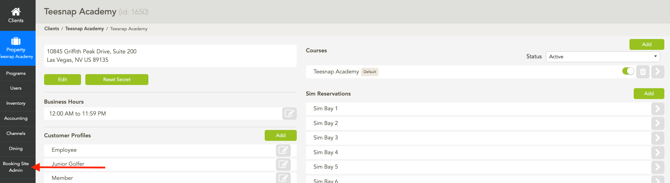
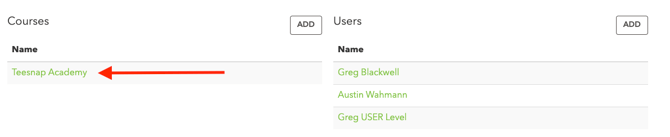
2\. Log in, then open the Properties section. Scroll to the bottom of the page and, under the Courses section, select your golf course.
3. In the Booking Restriction section, choose Split by Pass/Profile.
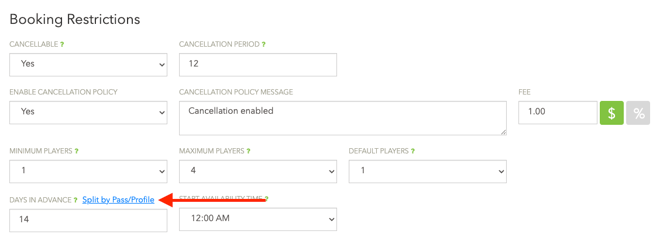
4\. Specify the number of days in advance that each Digital Pass can be booked. When you’re finished, click Save Changes at the bottom of the page.

---
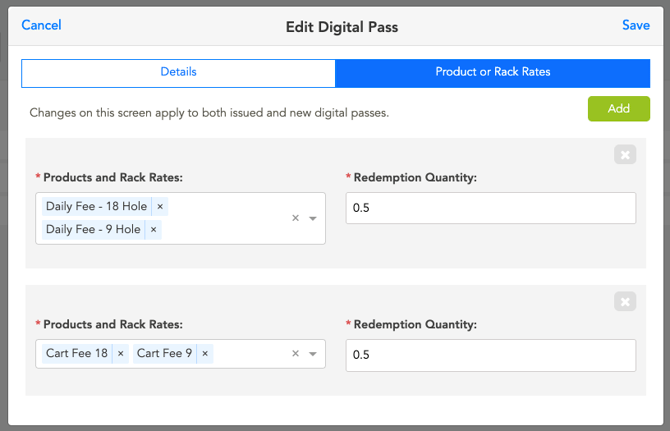
When building a Digital Pass for rack rates, you can now select 9-hole and 18-hole rates. This gives you the flexibility to assign different redemption amounts for 9 and 18 holes, or to create passes that are valid exclusively for either 9 holes or 18 holes.
**Set up for certain use cases:**
9 and 18 Hole rounds with different redemption quantities:
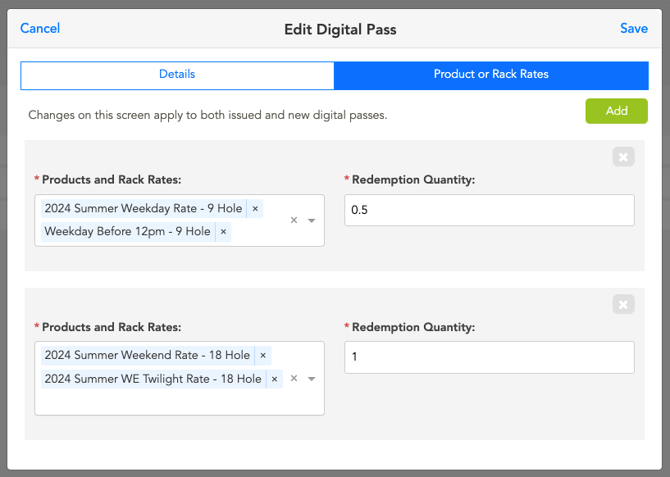
Rack Rate and Cart Fee Pass: (9 and 18 holes equal the same redemption value)
**If you have any questions, please do not hesitate to reach out to Teesnap Support by emailing us at support@teesnap.com or calling 844-458-1032.**
- [Teesnap App](https://support.teesnap.com/teesnap-app?hsLang=en#main-content)
- [Tabs](https://support.teesnap.com/teesnap-app?hsLang=en#tabs)
- [Checkout](https://support.teesnap.com/teesnap-app?hsLang=en#checkout)
- [Purchases](https://support.teesnap.com/teesnap-app?hsLang=en#purchases)
- [Tickets](https://support.teesnap.com/teesnap-app?hsLang=en#tickets)
- [User Menu](https://support.teesnap.com/teesnap-app?hsLang=en#user-menu)
- [Tee Sheet Management](https://support.teesnap.com/teesnap-app?hsLang=en#tee-sheet-management)
- [Customers](https://support.teesnap.com/teesnap-app?hsLang=en#customers)
- [Tables](https://support.teesnap.com/teesnap-app?hsLang=en#tables)
- [FAQ](https://support.teesnap.com/teesnap-app?hsLang=en#faq)
- [Tipping](https://support.teesnap.com/teesnap-app?hsLang=en#tipping)
- [Teesnap Administrative Portal](https://support.teesnap.com/teesnap-administrative-portal?hsLang=en#main-content)
- [Manufacturers](https://support.teesnap.com/teesnap-administrative-portal?hsLang=en#manufacturers)
- [Fulfillment Centers](https://support.teesnap.com/teesnap-administrative-portal?hsLang=en#fulfillment-centers)
- [Printers](https://support.teesnap.com/teesnap-administrative-portal?hsLang=en#printers)
- [Property Page](https://support.teesnap.com/teesnap-administrative-portal?hsLang=en#property-page)
- [Display Categories](https://support.teesnap.com/teesnap-administrative-portal?hsLang=en#display-categories)
- [Variable Pricing](https://support.teesnap.com/teesnap-administrative-portal?hsLang=en#variable-pricing)
- [Programs](https://support.teesnap.com/teesnap-administrative-portal?hsLang=en#programs)
- [Products](https://support.teesnap.com/teesnap-administrative-portal?hsLang=en#products)
- [Promotions](https://support.teesnap.com/teesnap-administrative-portal?hsLang=en#promotions)
- [Taxes & Fees](https://support.teesnap.com/teesnap-administrative-portal?hsLang=en#taxes-fees)
- [Accounting](https://support.teesnap.com/teesnap-administrative-portal?hsLang=en#accounting)
- [Courses](https://support.teesnap.com/teesnap-administrative-portal?hsLang=en#courses)
- [Users](https://support.teesnap.com/teesnap-administrative-portal?hsLang=en#users)
- [Channels](https://support.teesnap.com/teesnap-administrative-portal?hsLang=en#channels)
- [Bundles](https://support.teesnap.com/teesnap-administrative-portal?hsLang=en#bundles)
- [Inventory Audit](https://support.teesnap.com/teesnap-administrative-portal?hsLang=en#inventory-audit)
- [Departments and Inventory Categories](https://support.teesnap.com/teesnap-administrative-portal?hsLang=en#departments-and-inventory-categories)
- [Modifier Groups](https://support.teesnap.com/teesnap-administrative-portal?hsLang=en#modifier-groups)
- [Dining](https://support.teesnap.com/teesnap-administrative-portal?hsLang=en#dining)
- [Tee Sheet Setup](https://support.teesnap.com/teesnap-administrative-portal?hsLang=en#tee-sheet-setup)
- [Customer Profiles](https://support.teesnap.com/teesnap-administrative-portal?hsLang=en#customer-profiles)
- [Inventory Receipts](https://support.teesnap.com/teesnap-administrative-portal?hsLang=en#inventory-receipts)
- [Receipt Configuration](https://support.teesnap.com/teesnap-administrative-portal?hsLang=en#receipt-configuration)
- [Booking Site Admin](https://support.teesnap.com/booking-site-admin?hsLang=en#main-content)
- [Property Page](https://support.teesnap.com/booking-site-admin?hsLang=en#property-page)
- [Online Booking Engine (Customer Facing)](https://support.teesnap.com/booking-site-admin?hsLang=en#online-booking-engine-customer-facing)
- [Teesnap Reports](https://support.teesnap.com/teesnap-reports?hsLang=en#main-content)
- [How to Navigate Reports - The Basics](https://support.teesnap.com/teesnap-reports?hsLang=en#how-to-navigate-reports-the-basics)
- [Sales Summary Workbook](https://support.teesnap.com/teesnap-reports?hsLang=en#sales-summary-workbook)
- [Sales & Cash Overview Workbook](https://support.teesnap.com/teesnap-reports?hsLang=en#sales-cash-overview-workbook)
- [Customers Workbook](https://support.teesnap.com/teesnap-reports?hsLang=en#customers-workbook)
- [Rounds Report Workbook](https://support.teesnap.com/teesnap-reports?hsLang=en#rounds-report-workbook)
- [Inventory Workbook](https://support.teesnap.com/teesnap-reports?hsLang=en#inventory-workbook)
- [Teesnap Campaigns](https://support.teesnap.com/teesnap-campaigns?hsLang=en#main-content)
- [Campaigns General Tips and Training](https://support.teesnap.com/teesnap-campaigns?hsLang=en#campaigns-general-tips-and-training)
- [Automating your Email Marketing](https://support.teesnap.com/teesnap-campaigns?hsLang=en#automating-your-email-marketing)
- [Sim Reservations](https://support.teesnap.com/sim-reservations?hsLang=en#main-content)
- [Sim Reservation Basics - FAQ](https://support.teesnap.com/sim-reservations?hsLang=en#sim-reservation-basics-faq)
- [Hardware](https://support.teesnap.com/hardware?hsLang=en#main-content)
- [Printers](https://support.teesnap.com/hardware?hsLang=en#printers)
- [Credit Card Reader](https://support.teesnap.com/hardware?hsLang=en#credit-card-reader)
- [iPad](https://support.teesnap.com/hardware?hsLang=en#ipad)
- [Contactless Payment - Credit Card Readers](https://support.teesnap.com/contactless-payment-credit-card-readers?hsLang=en#main-content)
- [Checkout Experience](https://support.teesnap.com/contactless-payment-credit-card-readers?hsLang=en#checkout-experience)
- [Website](https://support.teesnap.com/website?hsLang=en#main-content)
- [Website Training Videos](https://support.teesnap.com/website?hsLang=en#website-training-videos)
- [Troubleshooting](https://support.teesnap.com/website?hsLang=en#troubleshooting)
- [Creating Domain Emails](https://support.teesnap.com/website?hsLang=en#creating-domain-emails)
- [Website Maintenance & Software Updates](https://support.teesnap.com/website?hsLang=en#website-maintenance-software-updates)
- [Website Help](https://support.teesnap.com/website?hsLang=en#website-help)
- [Updating Your Website Content](https://support.teesnap.com/website?hsLang=en#updating-your-website-content)
- [Event Calendar](https://support.teesnap.com/website?hsLang=en#event-calendar)
- [Online Store & WooCommerce](https://support.teesnap.com/online-store-woocommerce?hsLang=en#main-content)
- [Online Store](https://support.teesnap.com/online-store-woocommerce?hsLang=en#online-store)
- [How to Navigate Reports - The Basics](https://support.teesnap.com/how-to-navigate-reports-the-basics?hsLang=en#main-content)
- [Teesnap Reports](https://support.teesnap.com/how-to-navigate-reports-the-basics?hsLang=en#teesnap-reports)
- [FAQ Guide](https://support.teesnap.com/faq-guide?hsLang=en)
- [Heartland FAQ's](https://support.teesnap.com/heartland-faqs?hsLang=en)
[.png?width=230&height=52&name=Untitled%20design%20(86).png "Untitled design (86)")](https://www.teesnap.com/?hsLang=en)
Teesnap Support (844) 458-1032
Copyright © 2026, Teesnap
```json
{
"@context" : "https://schema.org",
"@type" : "VideoObject",
"contentUrl" : "https://stream.mux.com/BszieBZR7COfR00455W5DN2V7KmrYecHUpD00vO7H9xMA/capped-1080p.mp4",
"dateModified" : "2025-09-02T18:14:19.477Z",
"duration" : "PT4M21S",
"height" : 1080,
"name" : "Introducing Digital Punch Passes for T-Snap",
"thumbnailUrl" : "https://20628350.fs1.hubspotusercontent-na1.net/hubfs/20628350/Introducing%20Digital%20Punch%20Passes%20for%20T-Snap.mp4/medium.jpg",
"uploadDate" : "2025-09-02T18:13:06.605Z",
"width" : 1920
}
```