.png?width=240&height=55&name=Untitled%20design%20(86).png)
To apply club credit or gift card funds toward a tip, you’ll need to use club credit or gift card as the payment method for the transaction. Funds from system-generated Rain Checks cannot be applied toward tips.
Enabling Club Credit and Gift Card Tipping:
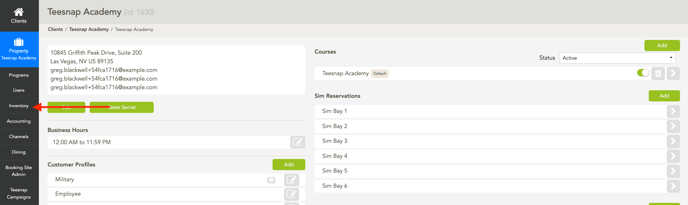
1. From the Teesnap Admin Portal, navigate to the Inventory section.
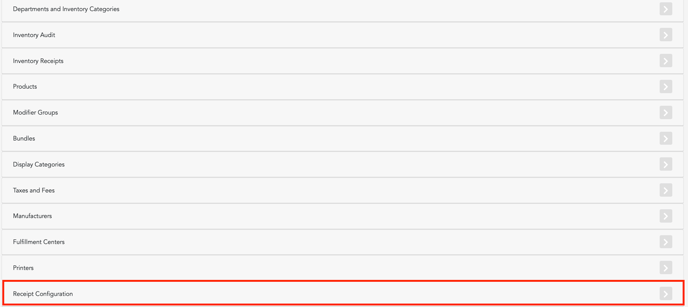
2. Select the Receipt Configuration option.
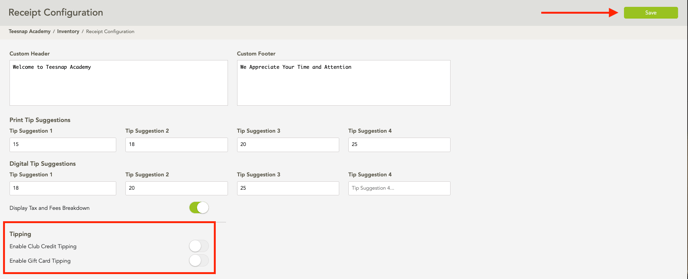
3. Under the Tipping section, turn on the options for Club Credit tipping and Gift Card tipping. Then click save at the top right.
Once club credit and gift card tipping are enabled, tips can be applied from these balances in the same way they are applied using credit cards or A/R.
In this example, we use club credit. The same processes will apply if you were using a gift card.
If you have any questions, please do not hesitate to reach out to Teesnap Support by emailing us at support@teesnap.com or calling 844-458-1032