.png?width=240&height=55&name=Untitled%20design%20(86).png)
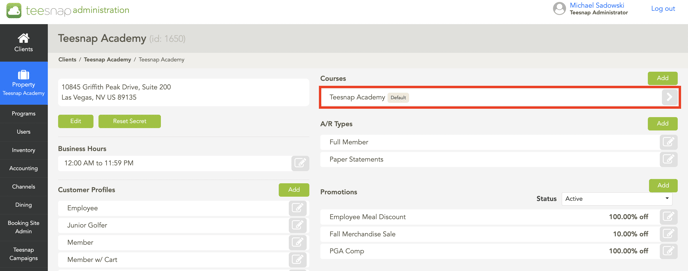
1. In the admin portal, click on the course in which you'd like to edit.
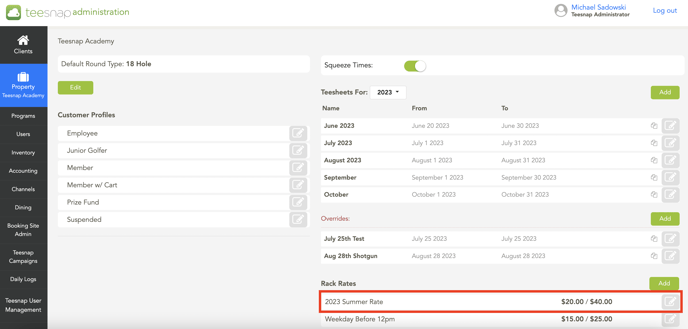
2. On the right side of the page near the bottom click the green add button to add a new rack rate or click on the grey pencil icon to edit a current rate.
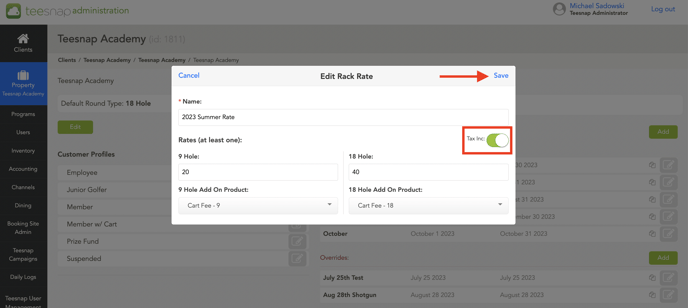
4. There is a "tax inclusive" toggle that can be enabled by clicking it one time. This will now signify that the 2023 Summer Rate has tax included. (It will come out to a flat $40).
If you have any questions, please do not hesitate to reach out to Teesnap Support by emailing us at support@teesnap.com or calling 844-458-1032.