.png?width=240&height=55&name=Untitled%20design%20(86).png)
Membership History Report - Inside the customer workbook, we have a new report dedicated to quickly identifying members in your database. You can use this report to identify which golfers have renewed or not and see historical data on any program that you offer.
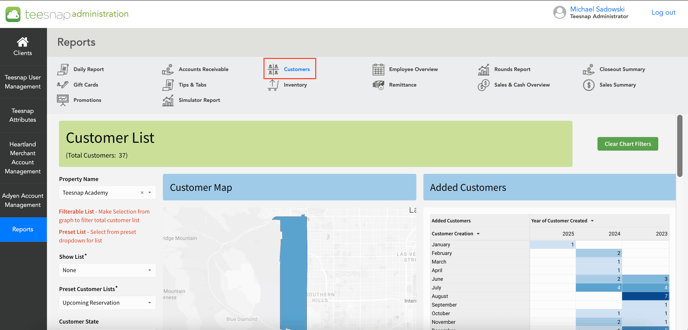
1. Navigate to the reports tab inside Teesnap Admin, then click on the Customers workbook.
 2. At the bottom of the customer's workbook click on "Membership History".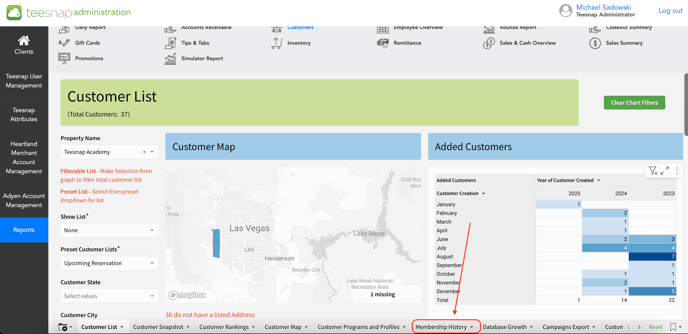
3. The membership history report will load with the ability to filter by: program name, customer email, and program start/end date. 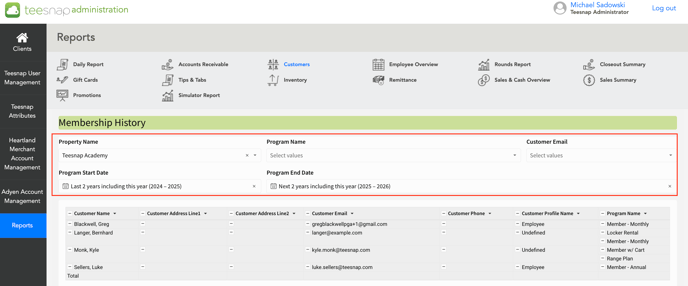
If you have any questions, please do not hesitate to reach out to Teesnap Support by emailing us at support@teesnap.com or calling 844-458-1032